Thursday, October 18, 2012

Why mobile apps platform ?


Why mobile apps platform ?
________________________________________________      
It’s necessary to understand why mobile applications are so important. Organizations and individual users often buy smartphones because they want to stay in touch via email and maintain their calendars and to-do lists while they’re away from the office. Some enterprise customers and many consumers buy smartphones because they’re cool, and they want to stay hooked into current technology. This has led to great opportunities in mobile platform.

1. Ubiquity of smartphones:
Smartphones will increasingly replace feature phones in stores. Nearly everyone will be able to use smartphone apps, not just – as of now – business people, social networkers and gamers.The main driver will be a reduction in handset prices.

2. Manifoldness of possibilities:
Smartphones are small computers which are becoming more and more powerful.
They will be suitable for an increasing number of tasks which have previously been restricted to laptops or desktops.

3. Ubiquity of app stores:
For the foreseeable future, Smartphones will always depend on the app stores.
If you have a smartphone or advanced feature phone you will have easy and convenient access to the world of apps.

4. Unmatched user-experience:
Apps offer a user-experience which mobile Websites or widgets are unable to provide.

  • Mobile Campaigns and Ads
Mobile marketing presents a distinct and unique way to create interactive dialogues with customers. Research indicates that mobile ads perform about five times better than Internet ads. The most common mobile ads are simple text links and display  adds that are sold based on cost per clicks, cost per acquisition and cost per thousand. These ads are much like the  paid search campaigns on Google, Bing or Yahoo! Use mobile marketing solutions to drive participation at exhibitions   or to drive traffic to retail environments.

  • Location-based Services
Location-based shopping coupons using mobile devices are gaining popularity. As mobile users become more acclimated to sharing their whereabouts via mobile devices.In fact, more than 50 percent of respondents indicated that they wanted to receive location-specific advertising.

  • Monetize Mobile Apps
Consider offering a free version of your app and then let users decide whether or not they are willing invest in a premium version with more features and content. Take for example the widely popular Angry Birds iPhone game.  Its ongoing promotion was to offer a free version, while paid subscribers were given access to more challenging   levels and other free add-ons.


5. Proximity to customers:
Mobile devices, especially Smartphones, are much more personal and intimate devices than a laptop or desktop device.  For most users their phones are never further than 1 meter away 24/7. Imagine how attractive it is for consumer goods,   food, and myriad other companies across the economy to be able to place their products and services so close to consumers.


Mobile OS
Desktop OS
Lightweight
Many features
Targeted to ARM
Targeted to x85
Less Powerfull
More Powerful
More concerned with battery life
More concerned with power


List of Mobile Operating System   
________________________________________________                            

  1. Symbian
    1. Developed by the Symbian Foundation
    2. Used to be the largest market share
    3. Nokia is abandoning Symbian for smartphones and only using it for feature phones
    4. Phased out by 2016.


  1. Bada
    1. Developed by Samsung
    2. Samsung plans to convert their feature phones to Bada making them smart phones
    3. Samsung still ships many Android smartphones

  1. webOS
    1. Launched by Palm, in 2009
    2. Bought by HP in 2010
    3. webOS hardware was discontinued in August 2011
    4. Possibly will make its way into printers and HP PCs
    5. HP announced that it will open source webOS


  1. Blackberry
    1. Developed by Research In Motion (RIM)
    2. Originally designed for business use
    3. Highly Secure
    4. Integration with corporate network (Email, contacts, network, etc).
    5. Switching to using QNX OS instead of the
    6. longstanding Blackberry OS


  1. Windows Phone / Windows Mobile
    1. Developed by Microsoft
    2. Replaced Windows Mobile in 2010
    3. New UI (Metro)
    4. Integration with Microsoft services
    5. Zune, Bing, SkyDrive, etc.

  1. Android
    1. Developed by a small startup, Android Inc.
    2. Purchased by Google in 2005
    3. Linux derived
    4. Open source and part of the Open Handset Alliance
    5. Developers have almost complete control

  1. iOS
    1. Developed by Apple Inc.
    2. Runs iPhones, iPads, iPod Touches, and
    3. AppleTV
    4. Based on the OSX Kernel


Why to be an iOS Developer

Sometimes I ask myself the question: why do I develop for iOS? I could also do Haskell development, do cool HTML5 stuff, or build compilers. As an indie developer, these are some important reasons for me.

  1. High-end platform
The iPhone and iPad are the high-end of the smartphones and tablets. This means that the people who use it are willing to pay more money for a better experience. As a side effect, they are also willing to pay for apps, and willing to pay for in-app purchases. For an indie developer, this is great. The more willing your customers are to spend, the better it is for us. Ultimately, it comes down to the developer making something that is worth the money, but it’s a lot easier to sell to high-end customers.

  1. Closed environment
There are a lot of disadvantages to having a closed environment, which is beyond the scope of this post. However, for customers it is mostly a big advantage: they can trust the applications. Because every single application has been reviewed by Apple, they know they can trust it. Because in-app purchases are built into the iOS Platform, they know they can trust the payments, which again makes it easier for developers to charge for something.

  1. Lots of possibilities for innovation
Innovation can definitely be everywhere, but I have the feeling we’re still only seeing the tip of the iceberg when it comes to innovation on mobile devices.  There is so much more we can still do with the location sensors, the fact that we always carry our phones, always have an internet connection, et cetera.  With the web or on the desktop there is still a lot of room for innovation too, but it is a lot harder to come up with new ideas.

  1. More difficult than web development
It is more difficult to get started with iOS programming than with web development. You need to do memory management, need to work with design patterns, learn a new language, and more. In web development, you can gradually ease in to it by first modifying HTML, then building your own HTML site, adding PHP, and so on. This makes the barrier to entry harder, which means it is easier to get noticed as an iOS developer.

  1. Great libraries
Apple provides awesome libraries. Even though I don’t like Objective-C so much, the frameworks they provide are really great. For example, animation is super-easy, and everything is very well thought out. This makes it a pleasure to work with.


  1. Culture of quality
On Mac and iOS, there has always been a culture of quality. Applications are very polished, and you can see that developers really put effort into building their products. This is a lot of fun and very inspiring for a developer. It pushes you to raise the bar and have higher standards. The defaults provided by Apple are very high quality too, which means it’s easy to build something that works and looks good.


  1. iOS Developers earn more  than Android Developers
As per Distimos Annual Report for 2011, iOS Developers made more money than Android Developers (source http://bit.ly/z3Bj0E). As per the report Apple App Store for iPhone generates about four times the revenue that is generated in the Google Android Market. That's a good reason to choose iOS over Android.

  1. Easy to test your apps thoroughly
There are only a handful of iOS Devices that you will need to test your apps. Thus, you can be sure that when you release your app it is going to run smoothly on each and every iOS Device. Also, all these devices are very popular, that's why it's easy to find someone using an iphone/ipod to test your app.

Again match that with the diversity of android devices which make it impossible to check your app on each and every device available in market. Even if the device features are same, yet the hardware inside the phone may belong to different manufacturers. Some hardware may not support the functionality that your app requires, as smoothly as other manufacturers hardware. Thus, the same app may not run similarly on two devices even with same technical specifications.

  1. Less Resources for Development
If you are going to develop for iOS platform you have to consider only two possible screen sizes (320x480 and 640x960) unless you are also developing for iPad. Also, even if you support just one screen size (320x480) it would run perfectly on higher resolution iPhone/iPod.

Compare that to the thousands of Android Devices available with so many of them having specific resolutions. Though you can shrink/stretch an image to fit a particular resolution, but that requires extra work on your part. iOS just reduces your work by maintaining screen size across different versions.

  1. Using Your App will Always be a Great Experience
The touch response of all the iOS Devices is great and you will be very satisfied when you use your app on them. Apple products  are always built using the best quality display and hardware components. Thus, you can be sure that your app will look great and respond quickly.

You will also find some excellent mobile phones running Android. But there are also a lot of android based handsets that are built using cheap components and use very poor quality  display material. So even though you make a terrific app, but using your apps on such low quality handsets will deeply disappoint you.

It’s like “Being with the winner make you the winner”.

  1. Think Different
Ever since the apple started it has always followed this very inspiring thought Think Different. Here’s a sample video narrated by lated Steve Jobs.


Friday, September 21, 2012

App Icons on iPad and iPhone


iPhone-only Apps

Include the following in your application's Resources group in the Xcode project:

Table 1  iPhone-only apps icon requirements.
Image Size (px)
File Name
Used For
Required Status
512x512iTunesArtworkAd Hoc iTunesOptional but recommended
57x57Icon.pngApp Store and Home screen on iPhone/iPod touchRequired
114x114Icon@2x.pngHome screen for iPhone 4 High ResolutionOptional but recommended
72x72Icon-72.pngHome screen for iPad compatibilityOptional but recommended
29x29Icon-Small.pngSpotlight and SettingsOptional but recommended
50x50Icon-Small-50.pngSpotlight for iPad compatibilityRecommended if you have a Settings bundle, otherwise optional but recommended
58x58Icon-Small@2x.pngSpotlight and Settings for iPhone 4 High ResolutionRecommended if you have a Settings bundle, otherwise optional but recommended

iPad-only Apps

Include the following in your application's Resources group in the Xcode project:

Table 2  iPad-only apps icon requirements.
Image Size (px)
File Name
Used For
Required Status
512x512iTunesArtworkAd Hoc iTunesOptional but recommended
72x72Icon-72.pngApp Store and Home screen on iPadRequired
50x50Icon-Small-50.pngSpotlight on iPadOptional but recommended
29x29Icon-Small.pngSettings on iPadRecommended if you have a Settings bundle, otherwise optional but recommended

Universal Apps

Include the following in your application's Resources group in the Xcode project:

Table 3  Universal apps icon requirements.
Image Size (px)
File Name
Used For
Required Status
512x512iTunesArtworkAd Hoc iTunesOptional but recommended
57x57Icon.pngApp Store and the Home screen on iPhone/iPod touchRequired
114x114Icon@2x.pngHome screen for iPhone 4 High ResolutionOptional but recommended
72x72Icon-72.pngApp Store and Home screen on iPadRequired
50x50Icon-Small-50.pngSpotlight on iPadOptional but recommended
29x29Icon-Small.pngSettings on iPad and iPhone, and Spotlight on iPhoneRecommended if you have a Settings bundle, otherwise optional but recommended
58x58Icon-Small@2x.pngSpotlight and Settings for iPhone 4 High ResolutionRecommended if you have a Settings bundle, otherwise optional but recommended

Add Icon files in Info.plist

To add the Icon files entry you will need to manually edit your Info.plist.
Open your Info.plist in Xcode, and locate the "Icon file" entry. Click on the plus (+) button at the end of the entry to make a new key entry. as shown in Figure 2.
Figure 2  Add a new entry under "Icon file" key

Then, type "Icon files" in the key column (notice the "s" added), or choose "Icon files" from the drop down list, as shown in Figure 3.
Figure 3  Add "Icon files" key in Info.plist

Next, turn down the disclosure triangle on "Icon files" and add the entries for the icons for your application, as shown in Figure 4 and Figure 5:
Figure 4  Add icon file entries for iPhone-only or Universal apps.
Figure 5  Add entries for iPad icon files.

Install apps on devices without certificate


         As you know to distribute the applications in App Store or even to debug them on real device according to Apple you have to pay $99 to achieve the provisiong and distribution certificate.But of course as you know, there are always other ways to achieve the similar result. But 1st. your device has to be jailbroken and 2nd. you can distribute your app only among jailbroken devices via Cydia, Icy or less friendly through SSH. It has advantages and disadvantage. Not all iPhones and iPod touches are jailbroken (I guess maybe 10% are), but you don’t have to obey the rules from Apple about submitted apps and you don’t have to wait at least one week for the review result.

Tasks you need to do only once (for developer):

  1. Jailbreak your iPhone
  2. Install LDID (Link Identity Editor), Mobile Termial and OpenSSH from Cydia
  3. Go to /Developer/Platforms/iPhoneOS.platform/Developer/SDKs/iPhoneOS3.sdk/
    I personally tested in on 3.0 that’s why I put that in bold, if you are going to built your app on a higher SDK, go to the appropriate directory.
  4. Open the SDKSettings.plist in your favorite editor (I recommend Property List Editor in Utilities) and in Root -> DefaultProperties set CODE_SIGNING_REQUIRED = NO. BTW check ifAD_HOC_CODE_SIGNING_ALLOWED equals NO and CODE_SIGNING_ENTITLEMENTS is blank.
  5. Save the file.

Please remember: modification of above .plist file simply allows you to build the package without signing it, so from now, you are able both to built package for Cydia and AppStore submission. Of course for App Store submission you provide a Distribution profile, for Cydia “Don’t Code Sign” in your project info under Build, Code Signing, Code Signing Identity, Any iPhone OS Device.


Tasks you need to do for every package (developer):

  1. Build your project without signing it (Don’t Code Sign).
  2. SSH your bundle to /Applications on your device. You can use Fugu for Mac or  WinSCP for Windows.
  3. Now you have to fake-sign it to make it working. Open Mobile Terminal and type:
    su root
    you will be asked for password, by default: alpine. Next:
    ldid -S /Applications/My\ Project\ Name.app/My\ Project\ Name
    make sure every space in name comes with the backslash before
  4. If any error occurs, it means that you have provided wrong file path or didn’t built it with “Don’t Code Sign”.
  5. Now you can test your application, how it works on real device with full touch control, accelerometer and device’s performance, it’s really different from the Simulator.
  6. If everything works correctly download the file that you modified with ldid – it’s the file named exactly the same as your project without any extensions, and replace it with original from your bundle.
  7. Now you can distribute it in your own way.


Tuesday, September 11, 2012

Installing Android SDK in ubuntu 12.04

The Android SDK provides you the API libraries and developer tools necessary to build, test, and debug apps for Android. You can download AndroidSDK package by running the commands below. At the time of this writing, the current version was r20. Or click this link to download the .tgz archive file.

                          
wget http://dl.google.com/android/android-sdk_r20-linux.tgz

After downloading, run the commands below to extract the downloaded file.
tar -xvzf android-sdk_r20-linux.tgz

After extracting the package, run the command below to change into the tools directory.
cd ~/android-sdk-linux/tools


Finally, run the commands below to begin the installation.
./android

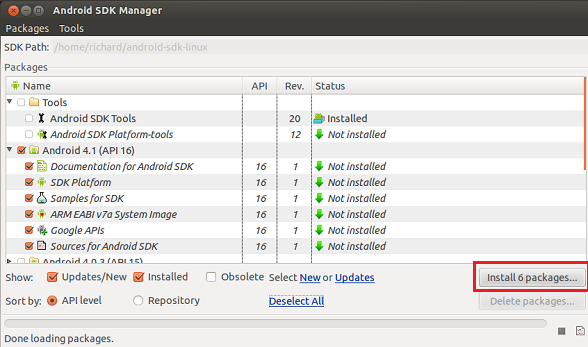
Install Android updates if there are any available.

android_precise_5


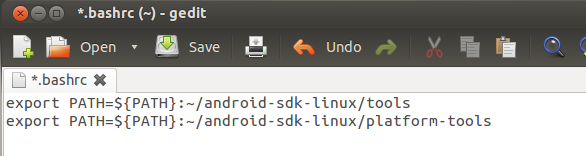
After updating, run the commands below to include AndroidSDK in your path environment.
gedit ~/.bashrc

Then add these lines at the very top of the file and save it.
export PATH=${PATH}:~/android-sdk-linux/tools
export PATH=${PATH}:~/android-sdk-linux/platform-tools

android_precise_6


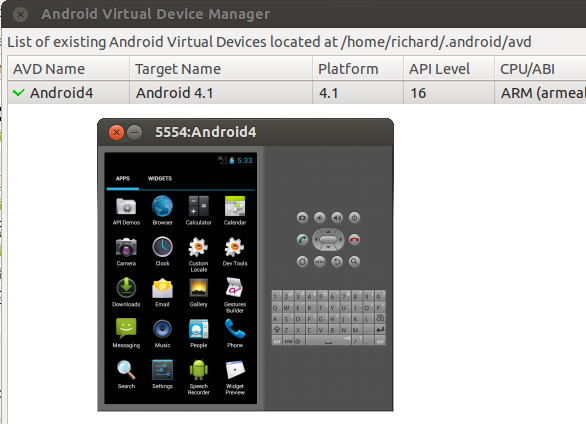
Log out and log back in, then type android on the command line to launch the software.
android

Build your own phone.

android_precise_7